Qwen-Image Edit 2509
Qwen-Image Edit 2509 is an advanced iteration of the Qwen team's powerful image editing model. It builds upon the core capabilities of its predecessor, offering enhanced performance and precision for text-guided image manipulation. This version is ideal for AI artists and designers seeking the latest improvements in instruction-based editing for tasks like fine-grained object modification, style application, and complex scene adjustments.
See more
Qwen-Image Edit 2509 is an advanced iteration of the Qwen team's powerful image editing model. It builds upon the core capabilities of its predecessor, offering enhanced performance and precision for text-guided image manipulation. This version is ideal for AI artists and designers seeking the latest improvements in instruction-based editing for tasks like fine-grained object modification, style application, and complex scene adjustments.
Connect Claude, Cursor, VS Code, or Codex to Layer’s MCP server and Qwen-Image Edit 2509 becomes a tool your agent can reach for — it picks the parameters, runs the generation, and shows you the result in the conversation.
https://mcp.app.layer.ai/mcpAsk your agent
“Use Qwen-Image Edit 2509 to generate 4 variations of a crystal sword icon on a transparent background.”
execute_forge({
  "base_model_id": "qwen-image-edit-2509",
  "prompt": "A crystal sword icon on a transparent background, game UI art",
  "batch_size": 4,
  "width": 1024,
  "height": 1024
})Authenticate with a personal access token, post the model’s own form, and poll the inference until it completes. Every field below is accepted by this endpoint.
# Start the generation — returns an inference id straight away.
curl -X POST https://api.app.layer.ai/api/v2/workspaces/$WORKSPACE_ID/base-models/qwen-qwen-image-edit-2509/inferences \
  -H "Authorization: Bearer $LAYER_TOKEN" \
  -H "Content-Type: application/json" \
  -d '{
        "prompt": "A crystal sword icon on a transparent background, game UI art"
      }'

# Poll until status is "complete" — the response then carries the asset URLs.
curl https://api.app.layer.ai/api/v2/workspaces/$WORKSPACE_ID/inferences/$INFERENCE_ID \
-H "Authorization: Bearer $LAYER_TOKEN"- prompt string
- Describe what to generate, or the change to make.
- negative_prompt string
- What to keep out of the result.
- aspect_ratio enumdefault SQUARE_1K14 options
- The shape and size of the output.
- quality enumdefault HIGHMEDIUM, HIGH
- Higher levels render more detail, and can take longer and cost more.
- seed integer
- The starting point for the model's randomness. The same seed and settings give the same result.
- guidance_scale numberdefault 40–20
- How closely the result follows the prompt. Lower gives the model more freedom.
- inference_steps integerdefault 502–100
- How many refinement passes the model makes. More add detail and take longer.
- transparency booleandefault false
- Output the subject alone, with no backdrop behind it.
- guidance_file_init_image file[]required
- The image to modify
- guidance_file_reference_image file[]
- Guides the edit
- output_fit any
- Trim the transparent margin, and place the image on a canvas of a fixed size.
- prompt_language string
- The language the prompt is written in, so it reaches the model as you meant it.
Create amazing image assets with Qwen-Image Edit 2509 on Layer
The complete content creation platform for modern game teams. From concepting to polished in-game assets - across Image, 3D, Video, and Audio.
Why use Qwen-Image Edit 2509 for image?
High-precision edits with excellent detail control
Qwen-Image Edit 2509 delivers extremely accurate, localized edits — from subtle color adjustments to intricate pattern changes — without distorting surrounding elements. Its improved fine-detail rendering makes it ideal for refining character features, materials, and cosmetic elements.
Strong structure and identity preservation across edit passes
This version of Qwen Edit maintains proportions, facial structure, poses, and item shapes even when applying multiple edits in sequence. It’s built for workflows where characters, environments, or in-game items must stay visually consistent across many variations.
Optimized for small-scale, UI-level, and high-readability assets
Edit 2509 handles icons, collectibles, ability visuals, and texture-level adjustments exceptionally well. Its clarity and precision ensure assets stay readable at mobile UI sizes, making it perfect for LiveOps content packs and item shops.
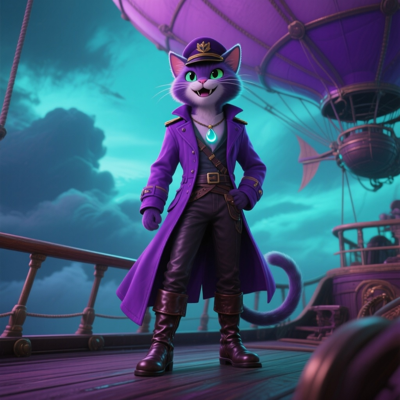
Character refinements with high structural accuracy
Adjust facial expressions, tweak outfit details, recolor materials, or apply themed cosmetic elements while preserving character identity. Edit 2509 ensures refined changes never warp silhouettes or shift proportions - essential for LiveOps skins and seasonal variants.
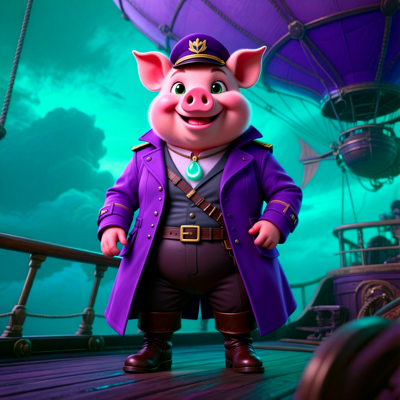
UA creative polish and targeted clarity improvements
Quickly refine lighting, boost read clarity, clean up edges, or highlight focal elements for ad performance. Qwen-Image Edit 2509’s strong structure retention ensures UA edits look clean without the artifacts common in lighter edit models.
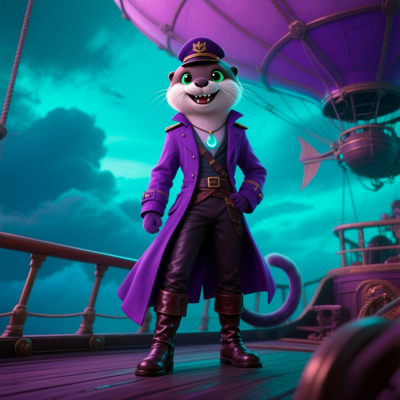
High-fidelity edits for items, icons, and inventory UI
Perfect for recoloring items, updating ability icons, refining reward visuals, or adjusting texture patterns. 2509 keeps tiny details sharp and avoids blurring or smearing - making it ideal for mobile games with dense UI systems.
FAQ
How much does Qwen-Image Edit 2509 cost? Is it free?+
How does Layer's pricing work?+
There are no seat fees, feature gates, or plans on Layer. Instead, our platform uses a consumption based system with Creative Units (CUs) with a flexible monthly subscription. Every generation on Layer (image, video, 3D, or audio) consumes a Creative Unit, and you only pay for what you create.
What Elo score does Qwen-Image Edit 2509 have?+
Other image models on Layer
Qwen Image 2.1
Qwen
Qwen Image 2.1 text-to-image and editing with configurable size, guidance, and seed.
Qwen Image 2 Pro
Qwen
Qwen Image 2 Pro tier with higher quality text-to-image generation and enhanced detail.
Qwen-Image Edit 2511
Qwen
Latest Qwen image editing model. Supports prompt-guided transformations with enhanced quality.
HiDream O1 Image 1.0
Hidream
HiDream's full O1 Image model — create, edit, and personalize images up to 2K in one native model.
Recraft V4
Recraft
Professional design model with extended prompt support (10,000 characters) and advanced style customization.
Qwen Image 2
Qwen
Qwen Image 2 standard text-to-image model with strong prompt adherence and diverse style support.