AI Item Evolution Chain Generator
How To Use AI Item Evolution Chain Generator

Choose
Select Item Evolution Chain from the template library in your Layer workspace.

Adjust
Upload your reference images, adjust parameters and customize settings for your specific needs.

Generate
Hit generate and Layer produces your results. Refine, iterate, or batch-produce at scale.
Item Progression Visualization
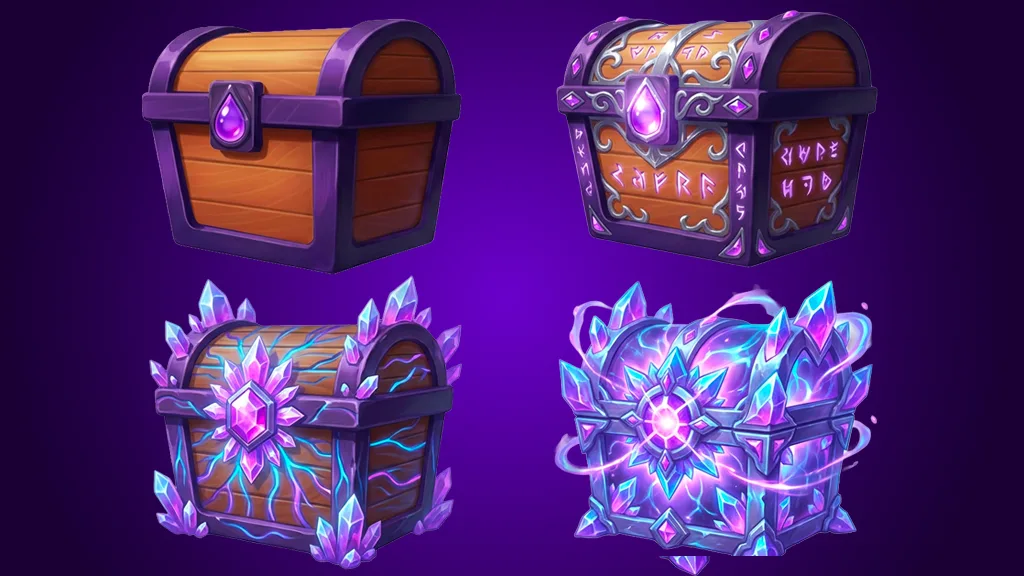
Generate a multi-stage visual evolution of any item, showing clear upgrades from base to max tier. Each stage builds on the previous design, making progression feel rewarding and visually coherent.
Weapon and Armor Upgrade Chains
Create upgrade sequences for weapons, armor, and gear that communicate increasing power through visual complexity. Define how much each tier changes to balance subtlety with impactful tier jumps.
Gacha and Rarity Tier Design
Produce rarity-based item variants from common to legendary that align with your monetization strategy. Each tier adds distinct visual elements that make higher rarities immediately recognizable to players.
In-Game Item Evolution Design at Scale
Batch-generate evolution chains across entire item catalogs for RPGs, idle games, and gacha titles. Maintain a consistent visual language across hundreds of items while keeping each evolution chain unique.
FAQ
What does the Item Evolution Chain Layer use case template do?
The Item Evolution Chain Layer use case template creates a multi-stage visual progression of an item, showing how it evolves over levels or upgrades.
When should I use this Item Evolution Chain use case template?
Use this Layer use case template when creating:
Progression-based item systems
Upgrade previews or reward visuals
Monetization or rarity showcases
How many evolution stages can be created?
Typically 3–5 stages, depending on how gradual or dramatic the evolution should be. For building longer stages say for level 1 to 10 or 20 or even 100 you can use Layer workflows.
Does this use case template preserve item identity?
Yes. Core item shapes and recognizable features remain consistent across stages.
Can I control how much each stage changes?
Yes. You can define subtle upgrades or dramatic transformations between stages.
Is this useful for game design and marketing?
Yes. It’s commonly used for in-game previews, UI, store visuals, and marketing assets.
Can I batch create evolution chains for multiple items?
Yes. Batch processing is supported, making it easy to scale progression content. For processing large sets of assets use Layer workflows.
More questions? Check out our Help Center .