

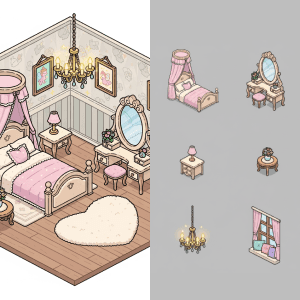
Isolate the items from a scene onto a grid.
How to Separate Items From a Scene ?
Discover More



FAQ
What are Layer templates used for?
Layer templates are designed to help game studios, UA teams, LiveOps teams, and artists automate a specific creative task using AI-powered workflows. It reduces manual work while maintaining visual consistency and production quality.
Do I need design or technical skills to use templates?
No. Layer templates are built to be usable by non-technical users, including marketers, product managers, and artists. Advanced users can customize prompts, styles, and inputs, but no coding is required.
Can I use templates with my own art style or assets?
Yes. You can upload your own reference images, styles, characters, or assets to ensure outputs match your game’s existing art direction.
What does the Separate Items From a Scene Layer use case template do?
The Separate Items From a Scene Layer use case template isolates individual objects from a scene and outputs them as separate assets, typically arranged on a grid.
When should I use this Separate Items From a Scene use case template?
Use this Layer use case template when you need to:
Build reusable asset libraries
Extract props or furniture from environments
Prepare items for UI, shops, or inventories
Does this use case template remove the background automatically?
Yes. Backgrounds are removed and clean asset cutouts are generated.
Is asset quality preserved?
Yes. Resolution, detail, and art style are maintained.
Is this useful for LiveOps and content reuse?
Very. It’s commonly used to repurpose existing scenes into modular assets. Decoration games are a perfect example of games which would need this template.
Can I batch extract items from multiple scenes?
Yes. Batch workflows are supported.
What types of scenes work best?
Scenes with clearly separated objects and minimal overlap work best.


